

Task Stack
Keep the event team working from the same task list.
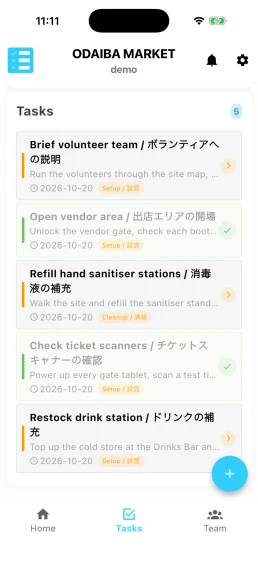
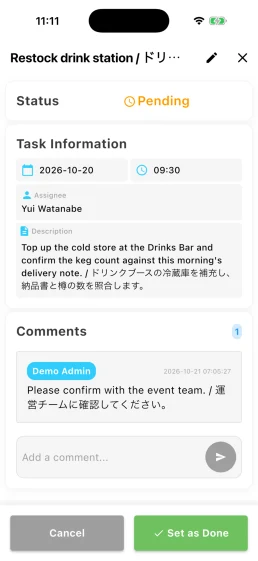
Task Stack puts the day's work on staff phones and tablets. People can see what is assigned, mark work complete and leave a note for the rest of the team.
Plan the work in Event Base
Create tasks by date and time, assign them to a person or team, add tags and link them to an exhibitor where useful. Unassigned tasks remain visible so they are not mistaken for work already covered.
Carry the list around the venue
Task Stack is designed for phones as well as tablets. Staff search or filter the list, open a task, mark it complete and leave comments when information needs to be shared.
See progress as the day moves
A completed task updates on connected devices within seconds. The team view shows progress by person, while the task history records who completed the work and when.
Practical details
- Staff sign in with their event badge when they need the My Tasks view.
- The assignee shows who should do the work. Anyone with Task Stack access can complete or reopen a task.
- Task Stack does not currently have a read-only access level.
Questions organisers ask
- Does Task Stack work on a phone?
- Yes. It is designed for staff who move around the venue rather than work at a fixed station.
- Can tasks be linked to an exhibitor?
- Yes. When enabled for the event, a task can be linked to a participant and filtered by that organisation.
- Can we give someone read-only access?
- Not at present. People with Task Stack access can create, edit, assign, complete and reopen tasks.



Tell us how your event team works.
Show us the jobs that need coordinating across the venue. We can look at how they would fit into a shared task list.