

Vendor Stack
Record what exhibitors sell in event currency.
Vendor Stack gives one exhibitor booth a simple product screen for transactions paid with coins, tokens or vouchers. It records the items exchanged and does not process the payment itself.
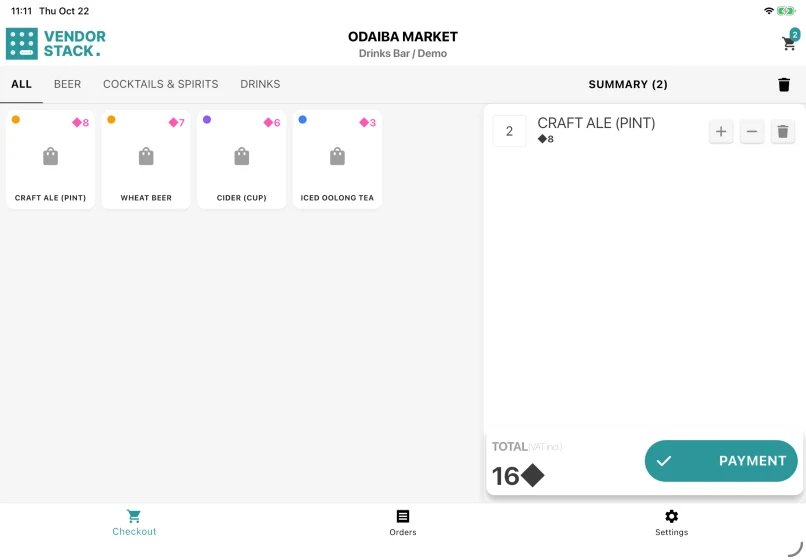
One booth and one seller
The tablet is assigned to a point of sale and the exhibitor working there. It shows that exhibitor's products and records every completed sale against both the booth and seller.
A short booth flow
Staff tap the products the visitor receives, check the total in the event currency, collect the coins or vouchers and complete the sale. There is no payment screen, change calculation or card terminal.
Continue during a connection interruption
Each sale is stored on the tablet first and synchronised afterwards, so the booth can continue recording transactions while the venue network is unavailable.
Reference data for settlement
The figures return to the exhibitor record in Event Base. They help the organiser and exhibitor review booth activity and settlement. Formal event sales totals come from POS Stack.
What you set up in Event Base
Event currencies, points of sale, the exhibitor assigned to each booth and the products and prices offered there.
POS Stack, Vendor Stack and Sales Stack
| App | Used by | Records | Best fit |
|---|---|---|---|
| POS Stack | Sales points run by the organiser | Products, payments and receipts | Cash, card or QR sales run by the organiser |
| Vendor Stack | An exhibitor at its booth | Products exchanged for event currency | Coins, tokens or vouchers already bought elsewhere |
| Sales Stack | The event revenue or settlement desk | Revenue reported by an exhibitor | Confirming and settling an exhibitor handover |
Questions organisers ask
- Does Vendor Stack take payment?
- No. The visitor has already bought the event currency elsewhere. The app records what they receive in exchange.
- Can one tablet sell for several exhibitors?
- No. A Vendor Stack device is assigned to one booth and one seller so every transaction remains attributable.
- What receipt is available?
- A digital receipt can be shown as a QR code when enabled. Vendor Stack does not use a receipt printer.
- Who can cancel a sale?
- An administrator or editor can cancel it on the tablet or in Event Base. There is no supervisor QR approval in Vendor Stack.





Show us how event currency works at your booths.
Tell us who sells what and how coins, tokens or vouchers are collected. We can look at the booth setup with you.