
Staff, tasks and time
Plan the people and work behind the event.
Build the staff schedule, assign work, clock people in and out and keep the records needed after the event in the same system.


Shifts around the event schedule
Create shifts against the event's dates and timezone, then assign staff to the right times and locations. Import a roster from a spreadsheet when planning happens elsewhere, and export it again when a printed or external copy is needed.

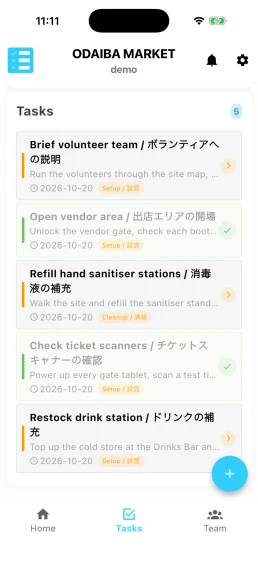
A shared task list for the day
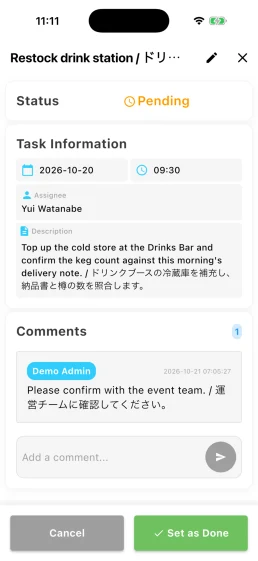
List the work that must be completed, assign it to a person or team and let staff update it from their phones. Completing a task records who finished it and when, keeping a useful history after the event.

Clock in and out at the staff entrance
Staff scan their personal QR code at a Time Stack tablet. Each clock event is retained, and Event Base pairs a check-in with the next check-out to calculate the duration and flag an unmatched record.


Staff access at the venue
A staff badge can also be scanned at a controlled entrance. The system checks the points of access assigned to that person and keeps the gate history with the staff record.
Participant staff
Exhibitors and other participating organisations can register their own event staff, schedule shifts and issue personal check-in QR codes through Participant Portal. The organiser can still manage the same information in Event Base.
Explore the platform
Questions organisers ask
- Can exhibitors manage their own people?
- Yes. Participating organisations can register staff, schedule shifts and issue check-in QR codes through Participant Portal.
- Can we import a roster we already have?
- Yes. Staff shifts can be imported from a spreadsheet and exported again.
- Does the task app work on a phone?
- Yes. Task Stack is designed for staff moving around the venue. A completed task updates for the rest of the team when the device is connected.
- How are incomplete timecards handled?
- Event Base pairs each check-in with the next check-out and flags an unmatched record for review. Corrections should keep the original clock events and their audit history.
- Can the same staff badge be used for time and access?
- The personal staff QR code identifies the same person, while Time Stack records working time and Access Stack checks entry permissions. Each app keeps the record relevant to its purpose.
Tell us how your crew is organised.
Show us how you plan shifts, assign work and record hours. We can map the parts that belong in Event Stacks and leave out the ones you do not need.